

You are here: Home > Access - Ribbons
Access - Ribbons
Example for a user-defined ribbon in Access:
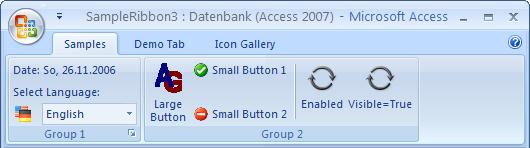
Access 2007 like other Office products has received a new user interface (UI). Menus and toolbars have been replaced by the Ribbons UI.
Ribbons cannot be adjusted as easily as menus or toolbars.
 However, it is possible to add items to the Quick Access Toolbar (QAT), using the arrow, then "More Commands..." .
This dialog allows you to adjust the QAT and to find out the correct idMSO for a ribbon control.
Remarks:
User-defined ribbons require a reference to "Microsoft Office 1(2|4).0 Object Library". Further information: here ...
Submenu
Last Updates:
 18.03.2021
New Download added. ...
25.10.2018
Update Site "Trusted Locations" ...
22.10.2018
New Download added. ...
08.04.2018
IDBE RibbonCreator 2016 (x86 and x64) for Office 2013 and Office 2016 - new release. ...
18.03.2021New Download added. ...
 |
 |
25.10.2018Update Site "Trusted Locations" ...
|
|
|
22.10.2018New Download added. ...
|
|
|
08.04.2018IDBE RibbonCreator 2016 (x86 and x64) for Office 2013 and Office 2016 - new release. ...
|
|
|
Last update: