

Sie sind hier: Gallery - getItemSuperTip
Gallery - getItemSuperTip
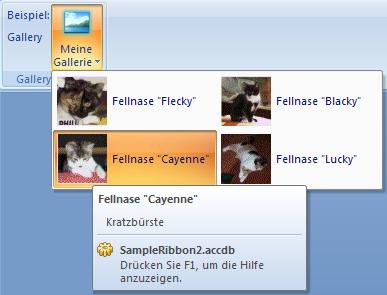
Der Callback liefert jedem Gallery Control Item ein Supertip - String zurück.
Beispiel XML Ribbon Datei:
<customUI xmlns="http://schemas.microsoft.com/office/2006/01/customui" onLoad="CallbackOnLoad">
    <ribbon startFromScratch="false">
        <tabs>
            <tab id="MyTab" label="Gallery Beispiel">
                <group id="MyGroup" label="Gallery Beispiel">
                    <labelControl id="myLabel1" label="Beispiel:" />
                    <labelControl id="myLabel2" label="Gallery" />
                    <gallery id="MyPictureGallery1"
                      label="Meine Gallerie"
                      columns="2" rows="2" size="large"
                      getItemImage="CallbackGetItemImage"
                      getItemCount="CallbackGetItemCount"
                      getItemLabel="CallbackGetItemLabel"
                      getItemScreentip="CallbackGetItemScreentip"
                      getItemSupertip="CallbackGetItemSupertip"
                      getItemID="CallbackGetItemID"
                      imageMso="PictureEffectsGlowGallery"
                      getItemWidth="CallbackGetItemWidth"
                      getItemHeight="CallbackGetItemHeight"
                      getSelectedItemID="CallbackGetSelectedItemID"
                      onAction="CallbackGalleryOnAction">
                    </gallery>
                </group>
            </tab>
        </tabs>
    </ribbon>
</customUI>
Funktion in einem Standardmodul:
Sub CallbackGetItemSupertip(control As IRibbonControl, _
                            index As Integer, _
                            ByRef screentip)
    ' Callback Liest den Supertip für ein Gallery
    ' Item aus der Tabelle und gibt diesen zurück
    Select Case control.ID
        Case "MyPictureGallery1"
            screentip = Nz(DLookup("txtSubName", _
                           "tblBilder", "txtPicName='" & _
                           Format(index, "00") & "'"), " ")
    End Select
End Sub
Sie finden dieses Beispiel auch in der Beispieldatenbank 2

Letzte Änderungen:
 18.03.2021
Neuer Download für Excel hinzugefügt. ...
25.10.2018
Seite "Vertrauenswürdige Speicherorte" - aktualisiert.. ...
22.10.2018
Neuer Download hinzugefügt. ...
08.04.2018
IDBE RibbonCreator 2016 (x86 and x64) für Office 2013 und Office 2016 - Neue Version. ...
18.03.2021Neuer Download für Excel hinzugefügt. ...
 |
 |
25.10.2018Seite "Vertrauenswürdige Speicherorte" - aktualisiert.. ...
|
|
|
22.10.2018Neuer Download hinzugefügt. ...
|
|
|
08.04.2018IDBE RibbonCreator 2016 (x86 and x64) für Office 2013 und Office 2016 - Neue Version. ...
|
|
|
Letzte Änderung: