

You are here: Home > Access - Ribbons > Ribbon XML / Controls > Combobox
Combobox
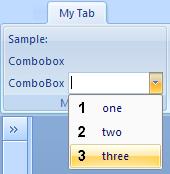
Sample Ribbon XML file:
<customUI xmlns="http://schemas.microsoft.com/office/2006/01/customui">
    <ribbon startFromScratch="false">
        <tabs>
            <tab id="MyTab" label="My Tab">
                <group id="MyGroup" label="My Group">
                    <labelControl id="myLabel1" label="Sample:" />
                    <labelControl id="myLabel2" label="Combobox" />
                    <comboBox id="Combo1"
                              label="ComboBox"
                              onChange="MyComboBoxCallbackOnChange">
                        <item id="item1" label="one" imageMso="_1" />
                        <item id="item2" label="two" imageMso="_2" />
                        <item id="item3" label="three" imageMso="_3" />
                    </comboBox>
                 </group>
            </tab>
        </tabs>
    </ribbon>
</customUI>
Attributes: enabled, id, idMso, idQ, image, imageMso,
insertAfterMso, insertAfterQ, insertBeforeMso, insertBeforeQ,
label, maxLength, screentip, showItemImage, showImage,
showLabel, sizeString, supertip, tag, visible
Added in O2010: invalidateContentOnDrop
Callbacks: getEnabled, getImage, getItemCount, getItemID,
getItemImage, getItemLabel, getItemScreentip,
getItemSupertip, getKeytip, getLabel, getScreentip,
getShowImage, getShowLabel, getSize, getSupertip,
getText, getVisible, onChange
You can find this sample in Sample DB 1
Last Updates:
 18.03.2021
New Download added. ...
25.10.2018
Update Site "Trusted Locations" ...
22.10.2018
New Download added. ...
08.04.2018
IDBE RibbonCreator 2016 (x86 and x64) for Office 2013 and Office 2016 - new release. ...
18.03.2021New Download added. ...
 |
 |
25.10.2018Update Site "Trusted Locations" ...
|
|
|
22.10.2018New Download added. ...
|
|
|
08.04.2018IDBE RibbonCreator 2016 (x86 and x64) for Office 2013 and Office 2016 - new release. ...
|
|
|
Last update: