

You are here: Home > Access - Ribbons > Load Ribbons Into The Database > ... Using Any User Table
... Using Any User Table
Create a new table named e.g.:"tblRibbons" with following fields:
|
Field Name |
Data Type |
Field Size |
|
ID |
AutoNumber |
Long Integer |
|
RibbonName |
Text |
255 |
|
RibbonXml |
Memo |
|
Enter a unique "RibbonName" and the appropriate XML in field "RibbonXML".
In a standard module create the new function "LoadRibbons":
Public Function LoadRibbons()
'Load ribbons into the database
On Error GoTo Error1
Dim db As DAO.Database
Set db = Application.CurrentDb
Dim rs As DAO.Recordset
Set rs = db.OpenRecordset("tblRibbon")
' tblRibbon has to be replaced by your table name.
    Do Until rs.EOF
        Application.LoadCustomUI _
        rs("RibbonName").Value, rs("RibbonXML").Value
        rs.MoveNext
    Loop
Error1_Exit:
    On Error Resume Next
    rs.Close
    Set rs = Nothing
    Set db = Nothing
    Exit Function
Error1:
    Select Case Err
        Case 32609
        ' Ribbon already loaded
    Case Else
        MsgBox "Error: " & Err.Number & vbCrLf & _
               Err.description, vbCritical, _
               "Error", Err.HelpFile, Err.HelpContext
    End Select
    Resume Error1_Exit
End Function
Create a macro named "AutoExec" which will be run when you open the database:
|
Action: |
RunCode |
|
Function Name: |
LoadRibbons() |
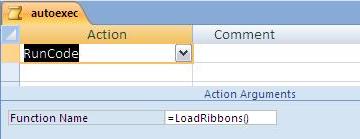
Re-start the database.
Assign the ribbon for this database:
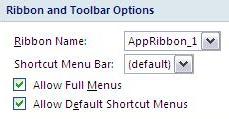 "Office Button" / Button "Access-Options" / "Current Database" / "Ribbon and Toolbar Options" / "Ribbon Name:" select the ribbon that should be loaded when you open the database.
After another re-start of the database your ribbon will be displayed.
Last Updates:
 18.03.2021
New Download added. ...
25.10.2018
Update Site "Trusted Locations" ...
22.10.2018
New Download added. ...
08.04.2018
IDBE RibbonCreator 2016 (x86 and x64) for Office 2013 and Office 2016 - new release. ...
18.03.2021New Download added. ...
 |
 |
25.10.2018Update Site "Trusted Locations" ...
|
|
|
22.10.2018New Download added. ...
|
|
|
08.04.2018IDBE RibbonCreator 2016 (x86 and x64) for Office 2013 and Office 2016 - new release. ...
|
|
|
Last update: